








- Customer Services
- CareShield and ElderShield
- Change payment method for GREAT CareShield or ElderShield Supplement
Change payment method for GREAT CareShield or ElderShield Supplement
Follow our guide to change payment method for your GREAT CareShield or ElderShield supplementary plan.
You can select one of the following payment methods when changing your payment method:
- CPF MediSave only
- CPF MediSave and GIRO
- CPF MediSave and credit card
- Cash or cheque only
- GIRO only
- Credit card only
To change your payment method to GIRO, credit card, or a combination of payment using your MediSave and GIRO or credit card, we encourage you to do so via the Great Eastern App, which is faster and more convenient.
For the use of MediSave as a payment method, please note the following:
- The CPF account holder must be the policyholder or the policyholder's spouse, child, parent, grandchild, or sibling
- Policyholders who are not Singapore Citizens or Permanent Residents are not allowed to use their grandchild’s or sibling’s MediSave
- For premium payment using MediSave, there is a supplementary cap limit of SGD600 per calendar year per life assured. The limit may be reached if you have other ElderShield or CareShield supplementary plans with us or other insurers. If the premium exceeds the supplementary cap limit or there is insufficient fund in the MediSave account(s), the balance amount has to be paid by cash or cheque.
Did you know?
You can change payment method via your Financial Representative, and they can also help follow up on your specific needs.
How to change payment method
Great Eastern App
- Great Eastern App
- Online and post
- Customer Service Centre
How to change payment method
Great Eastern App
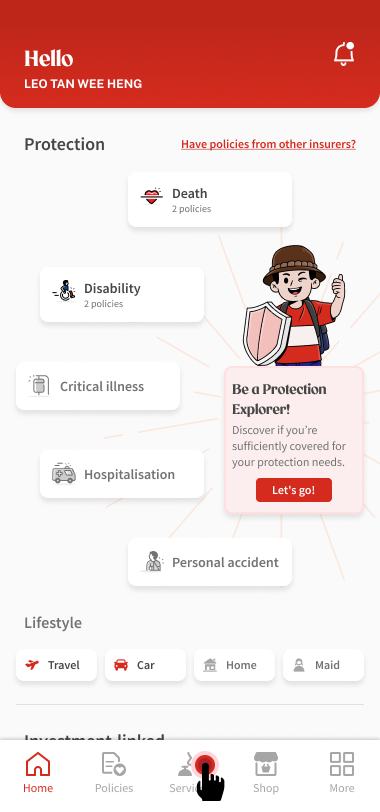
1
After signing in to the Great Eastern App using your Great ID or Singpass, tap Services from the bottom menu.
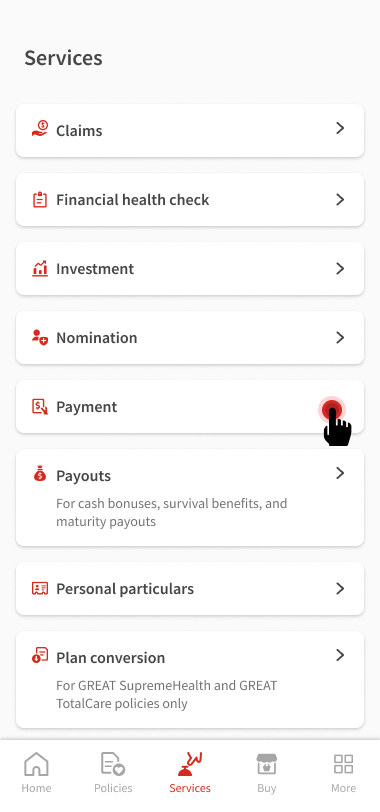
2
Tap Payment.
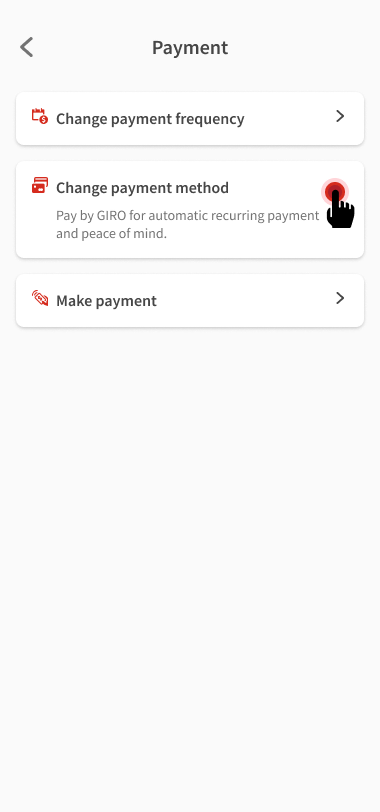
3
Tap Change payment method.
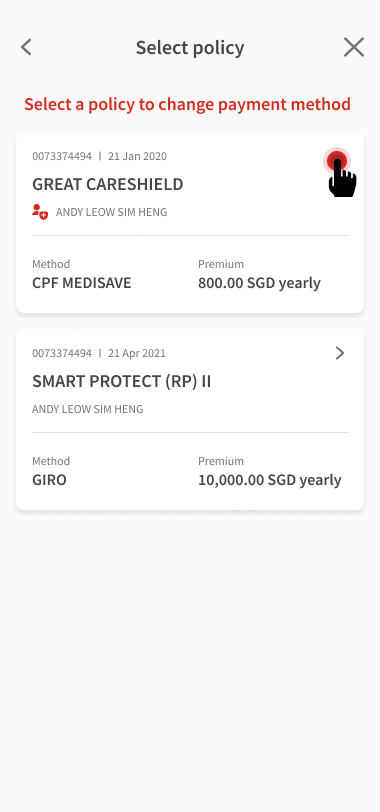
4
Select a policy to change its payment method.
5
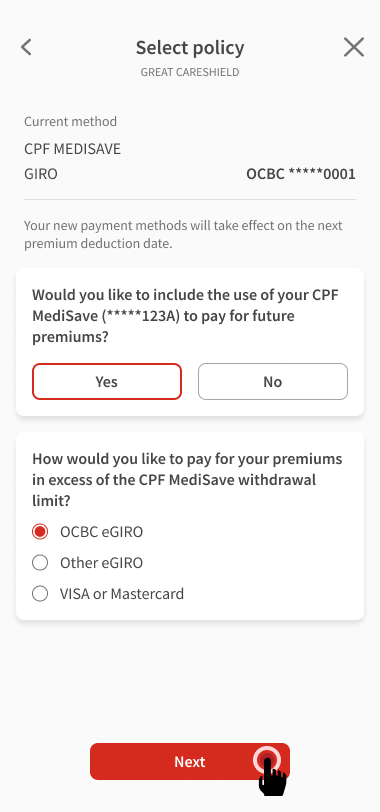
Select a payment method for premiums above CPF MediSave withdrawal limit, then tap Next.
6
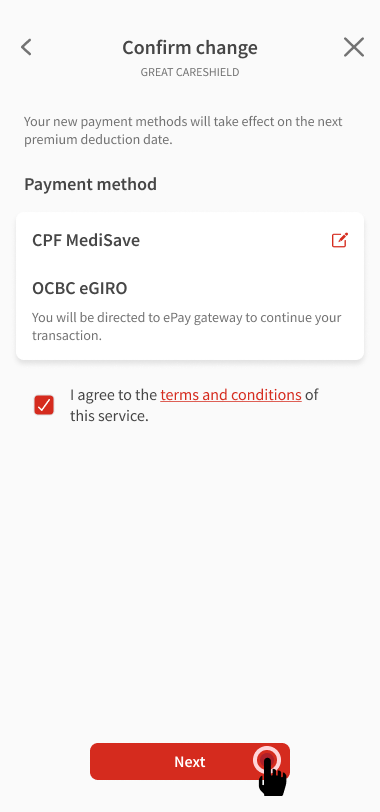
Confirm the new payment method, then tap Next.
7
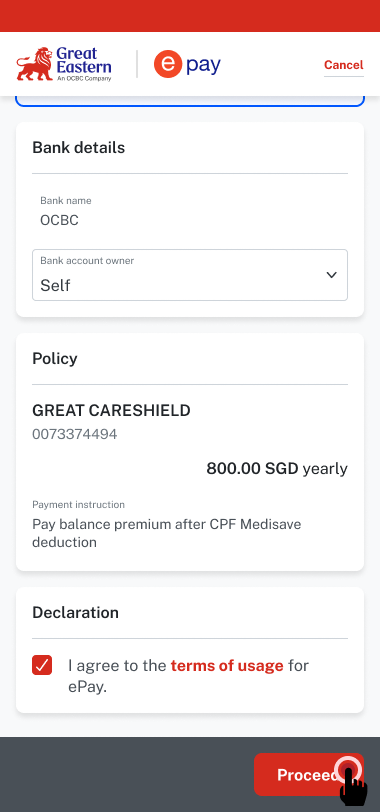
Verify that the details are correct and check the box to agree to the terms of usage. Tap Proceed.
8
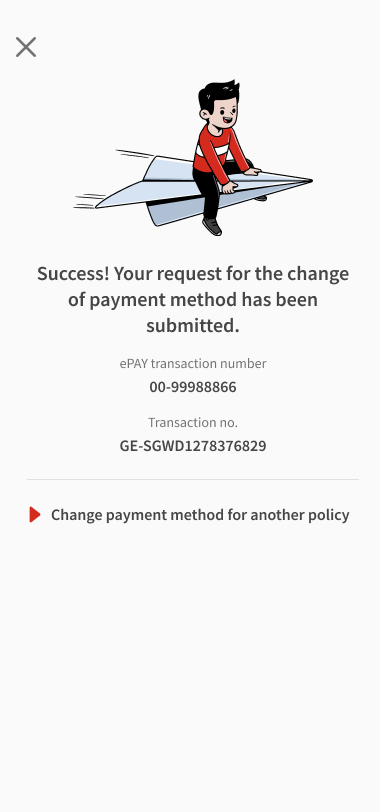
View your request status.
Download the Great Eastern App today!


The steps for changing payment method differ according to the option you have chosen.
Select the relevant payment method to proceed.
1. Download form
| Payment method you want to change to | What you need to do |
| CPF MediSave | Complete the Change payment method & authorisation for ElderShield Supplement / Great CareShield form |
| CPF MediSave and GIRO | Complete the transaction on the Great Eastern App
|
| CPF MediSave and credit card | Complete the transaction on the Great Eastern App |
| Cash or cheque | Complete the Change payment method & authorisation for ElderShield Supplement / Great CareShield form |
| GIRO | Complete the transaction on the Great Eastern App |
| Credit card | Complete the transaction on the Great Eastern App |
2. Submission
By online
You can also send all documents to us by post.
Attention to: Customer Service Department
The Great Eastern Life Assurance Company Limited
1 Pickering Street
Great Eastern Centre #01-01
Singapore 048659
The Great Eastern Life Assurance Company Limited
1 Pickering Street
Great Eastern Centre #01-01
Singapore 048659
You can visit us at our Customer Service Centres to change your payment method.